Showing posts with label Computer. Show all posts

Monday, September 3, 2012

Printer problem, which often occurs in canon printer

0 comment
I think Canon is a favorite printer, can be said of the favorite because this printer has good print quality, and fast. But maybe there are a lot of issues going on but not as often as other brands "do not say the name brand":-d one of the problems I experienced this morning on the printer canon ip 1980 which is when they want ngeprint it says -> "vacuum ink full service contact center "or the ink absorber is full well the problems which service center should be in contact :). Finally I tried googling and found articles that can overcome these problems, the results of googling that ane can to address issues that often arise in canon printer:

1. Blinking, Proofing indicator is flashing when printer is turned on
Usually this disease struck Canon iP1200, IP1300, iP1600, iP1700, i255, Lightweight Solution, this solution means you should do every time you turn on the printer, because this is only temporary. When your printer is disconnected from the power outlet, then it will re-emerge blinking. But there is not no harm in doing this step, if you are not familiar with ways to reset the printer using the software.
Unplug the power cord from your printer.
  • Press and hold the Power button, while you replace the power cord. The power indicator lights appear yellow. Release the power button when you have finished installing the power cable. Then press the power button again to turn on your printer.
    Ensure your printer is not blinking anymore. But when your printer is disconnected from the power outlet, then blinking will appear, and you just repeat the above steps.

Software Solutions, you can overcome this by using a blinking disease GeneralTool software specifically for iP 1300 and iP 1700. By using this software, blinking usually be resolved permanently, meaning you do not need to be repeated as the mild solution above.

2. Blinking, blinking when the ink runs out, or when the contents of the ink finishes

Usually this disease struck Canon iP 1880 printer, and occurs when the ink runs out or when you are done filling ink. Or even the ink is not depleted, but blinking is often struck iP 1880. One solution:

  • Press and hold the RESUME button for about 1 to 2 minutes
    Then open the lid or cover your printer.
    Open his first Cartridge and reinstall it
    Close the printer cover
    Turn off and then turn back

3. Letter Print results dashed (striped), uneven

Try performing cleaning several times, if that does not work well, you wash your catrige manually.

  • Best solution: based on the experience of some users, it is already time for you to replace your printer Catrige

4. Addressing the ink absorber is full Canon IP1700 and IP1200
solution:

  • Turn off the printer and unplug the power cord
    Press and hold the power button (not released) while then plug the power cord back
    When the power button is pressed and the power cable has been plugged back, press the resume button twice (in a row)
    Release the power button
    completed

Now your computer will detect a new printer, follow the steps requested until later installed a new printer.

5. Solution The waste ink absorber is almost full and the ink absorber is full Canon iP3000 and IP2000
solution:

  • Turn off the printer
    Press the reset button and then press the power button
    Press and hold the power button and then release the reset button
    Press the button again resume two times in a row and then release both buttons (the reset button and the power button)
    Green indicator will appear
    When the indicator is green, then press the resume button 4 times
    Press the power button, the printer off (turn off), if not press the power button again
    Printer back to normal.


    Taken from various sources
Read More..

Thursday, May 31, 2012

Using the Internet to Find Your Nice

0 comment
The Internet is a wonderful place where users can find a great deal of information. However, many are not aware that the Internet is also where some savvy entrepreneurs can find lucrative business opportunities. Internet niche marketing is just one example of how those in the know can turn their hard work and dedication into profit. This is not to say that Internet marketing is a simple field where anyone can prosper but there are opportunities for those how are willing to persevere in their efforts.

Learning Internet Marketing Online

Believe it or not Internet niche market is a subject that can be learned online. It certainly helps for those who hope to prosper in this industry to have some knowledge of marketing and business before venturing in an Internet niche marketing campaign but it is not necessary. There is a great deal of information on organizing and executing a niche marketing campaign available online. This information may come in a number of different forms including websites offering informative articles, message boards focusing on the industry and ebooks which are available free of charge or for a fee.

Let’s first examine learning about Internet marketing through websites. Type the search term, “Internet niche marketing” into your favorite search engine and you will likely receive millions of search results. Shifting through all of the search results would be rather time consuming and many of them would likely not be relevant. Fortunately the search engines do a great deal of work for you and the most useful websites will likely appear on the first couple of pages of search results. This still leaves you with a great deal of information to sort through but considering you are likely planning to turn niche marketing into a career this research is certainly worthwhile.

Carefully examine the search results you obtain from your search and bookmark the websites which seem most useful. Next take as much time as necessary to comb through all of these websites to find the most useful information. Take notes as you do to create a comprehensive resource for yourself. After this review your notes and investigate items which seem unclear to your further. This research may include offline resources such as books or phone calls to experts in the industry.

Search Engines are Your Friend

Now that you have already used the Internet to learn about the industry of Internet marketing, you probably know that finding a profitable niche is imperative. A niche is essentially a specific area of interest. Ideally you will already be an expert in this subject and it will be a subject which has a wide Internet audience without a great deal of existing websites focusing on this niche. Once again, you can turn to the Internet for finding this niche.

You may already have a few ideas for niches. These are probably subjects you are passionate about and understand very well. Examining statistical information provided by popular search engines regarding the popularity of search terms related to your niche will give you a good indication of whether or not Internet users are interested in your niche. If keywords related to your niche are searched on these search engines often, it is evident there is an audience for your niche. Next it is time to enter these keywords in a search engine and evaluate the websites which are provided as results for these keywords. If there are many strong results the niche can be considered saturated. In this case, it is a good idea to abandon the original idea and search for another niche. However, if there are not many high quality search results, you may have found your perfect niche.

Article Source: http://www.articlecity.com/articles/computers_and_internet/article_5652.shtml
Read More..

Asus launches world's thinnest notebook

0 comment

Asus finally launching a netbook product called the thinnest and lightest in the world. With a thickness of 17.6 millimeters and weighs 920 grams totaled, X101 series product is challenging thin laptops that are already on the market without sacrificing functionality.

This product has actually been exhibited in celebration of International Computer, Computex 2011, Taipei, Taiwan, a few months ago. The design is lightweight and slim netbook is meant to fit easily into a briefcase and can be carried easily anywhere.

This netbook allegedly deliberately made ​​for cloud computing to boost the ability to surf the internet. The proof lies in the use of Solid State Drives at 8 Gigabit without any harddisks.

The operating system used is MeeGo which basically has the functionality to work through the cloud computing as well as access to exclusive services such as Asus Vibe Asus, Asus AppStore, until online file storage facility that is Dropbox.

Specifications X101 is also not lost though initially targeted for netbook users and people who want to have a secondary computer. Processor which is embedded in this netbook is the Intel Atom, 1 Gb RAM, 2 USB 2.0 plugs, a micro SD slot, and a webcam. Innovations such as the Asus Super Hybrid Engine proud ensure the continued efficient performance of netbook so that it can save battery usage.
Read More..

Friday, March 23, 2012

Google's new offices soon be inaugurated in Indonesia

0 comment

Google plans to expand its business in Indonesia closer to reality, as the inauguration of the global internet giant office in Jakarta, in the near future.

In the invitation received detikINET, Thursday (03/22/2012), Google will inaugurate its representative office in Friday, March 30, 2012, at the Cyber ​​2 Tower building, Jakarta.

A number of important guests also mentioned would be present in the ceremony were, among others, Minister of Tourism and the Creative Economy Minister Mari Elka Pangestu and Trade Gita Wirjawan.

In addition to inaugurate its new headquarters, Managing Director, Google Southeast Asia Julian Persaud, also will introduce Google's Indonesia Country Head, who is still anonymous.

Although not mentioned his name, but who's going to be lined up Google boss for Indonesia, there is not a secret anymore. He is Ramawy Rudi, former officials at the RCTI.

This information is disclosed solely by Rudy LinkedIn account. In profile, he wrote has served as Country Head, Google Indonesia since early 2012.

"With the launch of Google's representative office in Indonesia, is expected to enhance the experience for users, advertisers, and also a partner of Google," writes Google distributed invitations.

source
Read More..

Ice Cream Sandwich Android market yet spread "sweetness"

0 comment

Jakarta - Since its launch in October 2011, the distribution of the Android 4.0 operating system is fairly old. Still a little gadget that can taste the 'sweet' Android nicknamed Ice Cream Sandwich (ICS) is.

Indeed, in a recent report, the percentage of the Android 4.0 has reached more than doubled in recent months, but the number was not yet even reached 2%.

According to latest data released by Google, only 1.6% of all Android devices running the latest version. Furthermore, as much as 0.4% handsets are adopting versions 4.0-4.0.2 Ice Cream Sandwich, and 1.2% running version 4.0.3.

While the most popular version of Android is 2.3.3-2.3.7, which is the latest version of Gingerbread. Because 'Ginger Bread' accounted for 61.5% of devices running the Android platform.

Right behind is the Android "Froyo" or 2.2, which accounted for 25.3% of all active devices.

Android Honeycomb, version 3.0 to 3.2 which is only used for tablets, has reached 3.3% adoption rate. Meanwhile, Android 2.1 (Eclair) there are those who use up to 6.6%,

While most versions of 'old', ie Android 1.6 (Donut) and Android 1.5 (Cupcake) began to disappear because it only accounts for less than 1%. Thus quoted from TG Daily, Thursday (03/22/2012).

In January, it was revealed that only 0.6% of Android devices that sample Ice Cream Sandwich, indeed increased, but the increase is very slow.

Ice Cream Sandwich is one of the biggest update to Android, including features such as scan your face to unlock the phone and technology Near Field Communication (NFC).

The ball is now in the hands of Google. Until when they still had to delay spread of sweet delicious presented Android Ice Cream Sandwich to the gadget that is ready to adopt?

source
Read More..

Thursday, March 22, 2012

The Unique Asus Padfone Tablet Ready to captivate Indonesia

0 comment

Jakarta - Asus will soon bring a tablet computer that is quite innovative, Padfone, in Indonesia. Asus Padfone is a unique gadget blend of smartphones and tablets.

"Yes, we will soon bring Padfone to Indonesia. Around the second quarter of this year," said Juliana Chen, Product & Marketing Manager at Asus Indonesia Hotel Sari Pan Pacific, Thursday (22/03/2012).

Padfone is Android device consisting of two types of gadgets. Ie smartphones and tablets that can be incorporated.

Yes, the uniqueness of this device is the tablet has a special slot in the back of the body to accommodate the smartphone. In this way, the new tablet can be enabled.

"For the price range Padfone we still can not mention right now," said Juliana.

Besides Padfone, Asus Indonesia was also considering to enter the tablet PC to another series. For example Transformer series which has a quad core processor.

Read More..

Tuesday, March 20, 2012

Dasar dasar Jaringan Komputer

0 comment
Dasar Jaringan Komputer

Jaringan komputer adalah sebuah sistem yang terdiri atas komputer dan perangkat jaringan lainnya yang bekerja bersama-sama untuk mencapai suatu tujuan yang sama. Tujuan dari jaringan computer adalah:

* Membagi sumber daya: contohnya berbagi pemakaian printer, CPU, memori, harddisk.

* Komunikasi: contohnya surat elektronik, instant messaging, chatting

* Akses informasi: contohnya web browsing

Agar dapat mencapai tujuan yang sama, setiap bagian dari jaringan komputer meminta dan memberikan layanan (service). Pihak yang meminta layanan disebut klien (client) dan yang memberikan layanan disebut pelayan (server). Arsitektur ini disebut dengan sistem client-server, dan digunakan pada hamper seluruh aplikasi jaringan komputer.

Sejak memasyarakatnya Internet dan dipasarkannya sistem operasi Windows95 oleh Microsoft, menghubungkan beberapa komputer baik komputer pribadi (PC) maupun server dengan sebuah jaringan dari jenis LAN (Local Area Network) sampai WAN (Wide Area Network) menjadi sebuah hal yang biasa. Demikian pula dengan konsep "downsizing" maupun "lightsizing" yang bertujuan menekan anggaran belanja khususnya peralatan komputer, maka sebuah jaringan merupakan satu hal yang sangat diperlukan. Dalam makalah ini akan dibahas sebagian komponen yang diperlukan untuk membuat sebuah jaringan komputer.

Sejarah Jaringan

Konsep jaringan komputer lahir pada tahun 1940-an di Amerika dari sebuah proyek pengembangan komputer MODEL I di laboratorium Bell dan group riset Harvard University yang dipimpin profesor H. Aiken. Pada mulanya proyek tersebut hanyalah ingin memanfaatkan sebuah perangkat komputer yang harus dipakai bersama. Untuk mengerjakan beberapa proses tanpa banyak membuang waktu kosong dibuatlah proses beruntun (Batch Processing), sehingga beberapa program bisa dijalankan dalam sebuah komputer dengan dengan kaidah antrian.

Ditahun 1950-an ketika jenis komputer mulai membesar sampai terciptanya super komputer, maka sebuah komputer mesti melayani beberapa terminal. (Lihat Gambar 1.) Untuk itu ditemukan konsep distribusi proses berdasarkan waktu yang dikenal dengan nama TSS (Time Sharing System), maka untuk pertama kali bentuk jaringan (network) komputer diaplikasikan. Pada sistem TSS beberapa terminal terhubung secara seri ke sebuah host komputer. Dalam proses TSS mulai nampak perpaduan teknologi komputer dan teknologi telekomunikasi yang pada awalnya berkembang sendiri-sendiri.

Jaringan komputer model TSS.

Memasuki tahun 1970-an, setelah beban pekerjaan bertambah banyak dan harga perangkat komputer besar mulai terasa sangat mahal, maka mulailah digunakan konsep proses distribusi (Distributed Processing). Seperti pada Gambar 2., dalam proses ini beberapa host komputer mengerjakan sebuah pekerjaan besar secara paralel untuk melayani beberapa terminal yang tersambung secara seri disetiap host komputer. Dala proses distribusi sudah mutlak diperlukan perpaduan yang mendalam antara teknologi komputer dan telekomunikasi, karena selain proses yang harus didistribusikan, semua host komputer wajib melayani terminal-terminalnya dalam satu perintah dari komputer pusat.

Jaringan komputer model distributed processing.

Selanjutnya ketika harga-harga komputer kecil sudah mulai menurun dan konsep proses distribusi sudah matang, maka penggunaan komputer dan jaringannya sudah mulai beragam dari mulai menangani proses bersama maupun komunikasi antar komputer (Peer to Peer System) saja tanpa melalui komputer pusat. Untuk itu mulailah berkembang teknologi jaringan lokal yang dikenal dengan sebutan LAN. Demikian pula ketika Internet mulai diperkenalkan, maka sebagian besar LAN yang berdiri sendiri mulai berhubungan dan terbentuklah jaringan raksasa WAN.

Evolusi Jaringan

a. Mainframe pada era 1960-1970 an

Pada tahun 1940-1n komputer adalah suatu alat dengan ukuran besar yang sangat rentan terhadap kesalahan. Pada tahun 1947, ditemukannya transistor semikonduktor membukan banyak kemungkingan untuk membuat komputer dengan ukuran lebih kecil; dan tentunya lebih handal. Pada tahun 1950-an institusi-institusi besar muladi menggunakan komputer-komputer mainframe, dimana dijalankan dengan program-program punched card. Pada akhir tahun 1950-an, Integrated circuit (IC) yang mengembangkan beberapa, dan sekarang jutaan, transistor pada satu semikonduktor yang kecil telah ditemukan. pada tahun 1960-an, mainframe dengan terminal dan IC telah banyak digunakan.

b. LAN (Local Area Network) pada era 1970-1980 an

Pada akhir 1960-1n dan 1970-an komputer-komputer yang lebih kecil dengan sebutan minicomputer telah diciptakan. Walau bagaimana-pun, minikomputer-minikomputer masih dalam ukuran yang sangat besar dibanding dengan standar modern saat ini. Pada tahun 1977, Apple Computer Company memperkenalkan mikrokomputer, dimana dikenal dengan sebutan MAC. Pada tahun 1981 IBM memperkenalkan PC pertamanya. Mac yang user-friendly, IBM PC yang open-archetecture, dan langkah lebih jauh dari proses "micro-minisasi" dari IC membawah penyebaran luas dari PC baik di rumah maupun di kantor-kantor.

Pada masa ini jaringan-jaringan local mulai dibuat dikembangkan dengan berbagai macam teknologi.

c. WAN (Wide Area Network) pada era 1980-1990 an

Pada pertengahan 1980 pengguna PC mulai menggunakan modem untuk berbagi file dengan komputer lain. Hal ini dikenal sebagiai point-to-point, atau komunikasi dial-up. Konsep ini disebar oleh penggunaan komputer yang merupakan pusat dari komunikasi dalam koneksi dial-up. Komputer-komputer ini disebut bulletin boards. Para pengguna akan konek ke bulletin boards, meninggalkan dan mengambil pesan, sebagaimana upload dan download file. Kekurangan dari tipe ini adalah sangat sedikitany komunikasi langgung dan selanjutnya hanya orang-orang tertentu yang tahu mengenai bulletin board. Pembatasan lain dari bulleting board adalah satu modem per satu koneksi. Jika lima orang terhubung secara simultan, hal ini akan memerlukan lima modem terkoneksi ke lima jalur telepon terpisah.

Jumlah orang yang ingin menggunakan sistem ini berkembang, sistem ini selanjutnya tidak dapat meng-handle kebutuhan yang terus meningkat. Sebagai contoh, bayangkan jika 500 orang ingin terhubung dalam waktu yang bersamaan.

d. Internet pada era 1990 an

Dari tahun 1960-an ke tahun 1990-an Departemen Pertahanan Amerika Serikat (DoD) mengembangkan Wide-Area Networks (WANs) yang besar, dapat dihandalkan untuk militer dan alasan-alasan sains. Teknologi ini berbeda dari komunikasi point-to-point yang digunakan dalam bulletin boards. Hal ini memungkinakan beberapa komputer untuk terhubung secara bersamaan melalui beberapa jalur berbeda. Jaringan itu sendiri akan bisa membedakan bagaimana memindahkan data dari komputer satu ke komputer lain. Satu koneksi dapat digunakan untuk berhubungan dengan banyak komputer pada saat yang bersamaan. Jaringan yang diterapka DoD nantinya akan menjadi jaringan yang mendunia pada saat ini yang disebut Internet.

Read More..

Tips pencucian Cartidge PRINTER

0 comment
Tips pencucian Cartidge/PrintHead
Pernah mengalami salah mengisi tinta warna? terbalik maksudnya.. merah di isi kuning/sebaliknya. Atau hasil printer garis-garis meski sudah di cleanhead. berikut ini tips untuk mengatasinya,..

1. JANGAN pernah mencuci PRINTHEAD/CARTRIDGE dengan ALKOHOL!!!
2. JANGAN menutup lobang pengisian dengan solatip/lem tembak
3. JANGAN melakukan refill sampe meluber di printhead ato keluar dari lobang pengisian. Isi secukupnya saja
4. GUNAKAN AQUABIDES/AQUA DESTILATION yaitu larutan murni yang biasanya dipakai sebagai pencampur obat suntik, untuk melarutkan tinta dalam cartidge
5. Untuk printer canon, lepas cartridge dan teteskan aquabides sampai keluar di lobang udara/sampai busa berwarna putih
6. Untuk printer HP, lepas cartridge, suntikkan aquabides sampe penuh kemudian sedot lewat printheadnya, alat penyedot bisa beli di refill centre.
7. Untuk Epson, tekan lobang keluar tinta/klep/katup keluar kemudian suntikkan aquabidesnya....
8. Aquabides juga bisa digunakan untuk membersihkan prinhead epson, caranya : sambung suntukan dengan selang kecil seukuran klep printhead, kira2 diameter 1,5mm, isi suntukan dengan aquabides dan tancapkan ujung selang ke pin tempat tinta masuk ke printhead, suntuk perlahan sampe larutan keluar dari printhead dibawah....

Larutan Aquabides bisa diperoleh di apotik, harga 1 liternya ga sampe 10 ribu... selamat bereksperimen
Read More..

ERROR KODE CANON MP145/MP160 :

0 comment
ERROR KODE CANON MP145/MP160 :
E2-2 = tidak ada kertas (ASF)
E3-3 = Paper jam
E4 = tidak ada tinta/cartridge
E5-5 = ink cartridges tidak terpasang atau cartirdge yang terpasang salah (tidak compatibel)
E8 = absorber full, atau platen waste ink absorber full mita direset
E9 = hubungan ke digital camera / video camera tidak support
E14 = Ink cartridges whose destination are wrong
E15 = Ink cartridge tidak terpasang E16 - Ink remaining is unknown
E16 -E19 = masalah pada scan head alignment sheet
E22 = Carriage error
E23 = Paper feed error
E24 = Purge unit error (bagian cleaning head)
E25 = ASF(cam) sensor error
E26 = Internal temperature rise error
E27 = ink absorber full or platen waste ink absorber full > reset dengan toolsnya
E28 = Ink cartridge temperature rise error -
E29 = EEPROM error
E33 = Paper feed position error
E35 15 = USB Host VBUD overcurrent error - USB
E37 17 = motor driver tidak normal
E40 20 = hardware lain error
E42 22 = Scanner error

CARA MERESET WASTE INK COUNTER CANON MP160/MP145
Sebelum mereset lihat dulu pesan error yang terdapat pada lcd printer anda :
cara dibawah ini digunakan untuk memperbaiki printer yang mempunyai pesan ERROR E27 dan ERROR E8


1. Matikan printer(kabel power masih terpasang), tekan dan tahan tombol STOP/RESET kemudian tekan dan tahan tombol ON/OFF dan lepas STOP/RESET,
kemudian tekan tombol STOP/RESET 2x
2. Lepaskan kedua tombol, sekarang printer dalam posisi SERVICE MODE (pada LCD printer muncul angka"0")
3. Setelah lampu on/off berwarna hijau, silahkan tekan tombol STOP/RESET sesuai dengan petunjuk berikut:
di tekan 1x = lampu Orange nyala >untuk Service pattern print
di tekan 2x = lampu Hijau nyala >untuk EEPROM print
di tekan 3x = lampu Orange nyala >untuk EEPROM reset
di tekan 4x = Lampu Hijau Nyala >untuk Waste ink counter reset
4. Matikan printer dan cabut kabel POWER.
5. Hidupkan kembali printer anda

Read More..

Friday, December 30, 2011

Hitachi Deskstar launches 4TB Hard Drive

0 comment

To meet the increasing demands on storage capacity of desktop computers, Hitachi Global Storage Technologies has launched a new hard drive that is internal 4TB Deskstar 5K4000. Deskstar 5K4000 is a 3.5-inch drive (5400 RPM) with a 32MB cache buffer and CoolSpin technology to be able to reach the level of 2.5 bels idle acoustics. Hard drive is also supported with software that allows large storage on one disc and be able to significantly increase the size of the sector take advantage of features Advanced Format, ie, from 512 bytes to 4096 (4K) bytes.

With CoolSpin Technology ™, Deskstar 5K4000 4TB provides a remarkable blend of power efficiency and performance, making it the ideal solution for power usage about 33 percent lower compared with 3TB drives currently on the market. Besides these new products also meet the standards of the Hitachi EcoTrac ™ classification of halogen-free design and more efficient power both in the field of product design, manufacturing, operation and disposal to minimize environmental impact.

In addition to the internal disk drive, Hitachi is also launching an external version, the Deskstar 5K4000 External 4TB Touro. External version was wrapped with black textured chasing so it looks nice and sturdy, as well as using the interface plug and play USB 3.0 compatible with PC or Mac. In addition to the purchase of each unit of Touro 4TB External Deskstar 5K4000 will get a bonus of free storage in the Cloud platform for 3GB of HitachiBackup.com where users can access their data anytime and anywhere via smartphone or computer web browser. Hitachi external hard drive will be available with a capacity of 4TB, 3TB, 2TB and 1TB.

For those of you who are interested, do not rush first. Due to Both versions of the new Deskstar 5K4000 will be available early next year with each priced at $ 399.99 to $ 419.99 an internal drive and external versions for the capacity of 4TB.
Read More..

Thursday, December 29, 2011

REMnux-3 Linux distribution for Malware analysis

0 comment
A new version is distributed REMnux specifically on Linux has been released. This new tool serves to make reverse-engineering malware, including tools to perform forensic analysis on memory as well as analysis of potentially malicious PDF files.

REMnux first released last year and is the work of Lenny Zeltser, a SANS instructor and malware. Remnux designed to create an independent environment that analyzes and perform reverse-engineering malware and other malicious applications and Web sites. This file can be downloaded separately and on the run via a CD or virtual drive.

There are two new features on the new REMnux in this release of Origami Framework, which can be used to analyze PDF files are dangerous. And the second is a Volatility Framework is to perform forensic analysis on memory. In addition to these features, REMnux version 3 is also equipped with other features.

Some of them are:
- For network analysis: NetworkMiner, ngrep, pdnstool
- Analysis PDF: PDF X-Ray Lite (pdfxray_lite and swf_mastah), peepdf
- Analysis of JavaScript: Chrome JavaScript engine (D8), js-Beautify, and to
- Examining file: Hachoir (hachoir-subfile, hachoir-metadata, hachoir-urwid), pyew, densityscout, findaes.

In the latest version of this REMnux also include a user manual that gives some pointers on how to get started and supporting commands to run the operation.
Read More..

Thursday, December 22, 2011

Ubuntu 12.04, Linux OS Offering More Efficient Energy Consumption

0 comment

Your laptop has a problem with batteries? Perhaps these problems can be solved using the Ubuntu OS version 12:04.

Ubuntu engineer named Colin King said that he is now working on power management of an OS. The goal, he wants the energy consumption of the Ubuntu 12:04 can be more efficient compared to other OS. OS is reportedly going to be downloaded in April 2012.

In a test conducted King, reduction of power consumption has been fruitless. This OS will arrange for USB, PCI controller, wireless, Bluetooth and other features that consume less power.
Read More..

Thursday, December 8, 2011

Nine Disease Due to Technological Progress

0 comment

Technology does offer convenience in the activity. But convenience is not necessarily without consequence. Research has found there are some health problems due to the use of technology in everyday life ranging from depression up to narcissism.

The nine diseases caused by technological advances as reported DailyRecord, Friday (11/25/2011), among others:

1. Hypersensitivity to Electromagnetic Waves from Wifi to Signal Phone

From wi-fi signal to a cell phone, people are surrounded by wireless communication. And for some people, exposure to electromagnetic fields can make the illness. Symptoms range from acute headaches and skin-burning up muscle twitching and severe pain.

An estimated 5 percent of Americans believe that they suffer from this condition and some of them have moved away to areas where wireless communication can dikonrtol strictly controlled to avoid problems.

2. Depression Facebook

Earlier this year, a group of physicians in the U.S. warned that teenagers can become so obsessed with Facebook and the expense of his health.

American Academy of Pediatrics states that neglected children on social networking sites would be more depressed than ignored in real life.

This organization warned of the risk of mental health of children who are victims of cyber-bullying and confirms that the use of some of the websites in the long run can affect sleep patterns and level of self-esteem.

3. Repeated strain injuries which caused a lot of Typing on Keyboard

Usually factory workers, tailors and musicians who had the most at risk of developing repetitive strain injuries. But today's office workers can suffer similar problems due to spending too much time using the keyboard.

The use of fingers, wrists, arms and shoulders repetitively can cause damage that can not be repaired by the body from time to time. Preventive measures such as regular breaks are recommended.

4. Headaches Due to Mobile Phone

For years, experts engaged in a fierce debate over whether cell phones dangerous or not. But studies have shown no relationship between headache and the use of mobile phones.

Research commissioned by mobile phone manufacturers in 2008 and found that a phone call shortly before bedtime can affect sleep quality can cause headaches the next day.

5. Internet Addiction

Many psychiatrists today that offer treatment for Internet addiction and has been treating patients who say that the online world has taken over his life.

According to U.S. psychiatrist, Jerald Block, the condition must be seen as a clinical disorder to see the ever increasing number of people who are addicted to gaming and pornography on the intenet.

6. Reduced Loss due to musical instruments such as Ipod

Some diseases may be new technology over troubling for 10 to 15 years. But already more than 30 years since it first raised concerns that listening to loud music through speakers may damage hearing.

The iPod has replaced the Walkman, but concerns remain the same. France has banned the gadget manufacturers to manufacture earphones that produce noise exceeds a certain level.

7. Play Nintendo Wii injury time

When the Nintendo Wii was first released, people of all ages are excited to try this game that replaces the 'stick' that ancient. The problem is many people who enjoy playing Wii games to lose track of time, causing muscle spasms.

8. Drunk from Game or Movie 3D

A peneltiian Association of Ophthalmologists released in the United States have found health problems due to television and 3D games. A quarter of users reported experiencing eye strain, blurred vision, dizziness, headache, or nausea after viewing 3D content.

People who experience such symptoms of drunkenness are highly susceptible to visual tricks that are used as a trick of visual technology.

9. Narcissism on Social Networking Sites

A study published earlier this year by two U.S. academics who find students who are getting fatter more selfish than previous generations because of the influence of modern technology.

Students of today are also more likely to display less narcissistic behavior and show empathy seeprti displayed in behavior or habit of constantly updating social networking sites.

In peneltiian, the men found to be more inclined to do this, although they are assumed not to use technology more often than women.a
Read More..

Wednesday, December 7, 2011

The Release List of 25 Password Hacker Prone burglarized by SplashData

0 comment
Password synonymous with privacy. Therefore, the selection of the password must be careful, do not let your passwords easily broken by others. SplashData, a company that created a password management application data recently released a list of 25 passwords that are often used and often become targets of hackers.
CEO of SplashData, Morgan slain advise those who use the list of 25 passwords is to immediately replace it. "The hackers can easily break into many accounts by trying commonly used passwords repeatedly," he told The Telegraph.

Accounts on the Facebook social networking is often the target of hackers. Last month, it was revealed that hundreds of hackers trying to find victims on social networks popular in the world. The goal is to get the photos, messages and other personal information.

Here is a list of passwords that hackers cracked cartilage results from SplashData releases:

1. password

2. 123456

3.12345678

4. qwerty

5. abc123

6. monkey

7. 1234567

8. letmein

9. trustno1

10. dragon

11. baseball

12. 111111

13. iloveyou

14. master

15. sunshine

16. ashley

17. bailey

18. passw0rd

19. shadow

20. 123123

21. 654321

22. superman

23. qazwsx

24. michael

25. football
Read More..

Six Ways to Secure Computer

0 comment
Computer security article!? maybe this is something that is often discussed in various articles about computers in all blogs on the internet. I myself since my computer is connected to the internet has not even faced a serious problem with the name of the virus. Although've occasionally made ​​him dizzy


Well at least until the article was written computer security!

I think there are 6 things that we ought to do so we are not exposed to computer tecinta or contracting a virus. Automatic computer security if we talk we talk about how to prevent computer viruses.

As for computer security affairs from the thief's actions beyond this article: D Here are specializing only weeks to Internet viruses.

Here are 6 Tips Computer Security articles :

1. Use AntiVirus

Of course this is the most important. Would not want anti-virus as a guard that will prevent a variety of viruses. Oh yes! If nggk have money do not use pirated antivirus free antivirus ... use only. Not really a great lost in combating Internet viruses.

2. UPDATE!

Do not forget to always update anything for computer security. Not only is it an updated anti-virus. EVERYTHING! Operating either systemnya, installed software and drivers. No software or software that is perfect .. there must be a security hole. Do not trust a programmer who says "I sepurna Software in computer security"

To close the security hole that we have to update and update. Because the Internet is also always update virus and updates.

3. Be careful when browsing

Most viruses spread of Internet porn sites and warez (mp3 illegal, pirated software, etc.). If you do not want exposed to the virus so do not go there. This is the best way to prevent computer viruses.

But I know you are addicted to such sites. Then than it is if there is a warning from your browser, it's better just ignore those sites. Or during a visit to the website whose content the dialog box appears asking to install something .. just been ignored.

Be wary of such sites typically use puns like he was giving a gift to you. In fact it is an Internet virus that can interfere with computer security.

4. Always scan files downloaded

Any files that you download even if it comes from a trusted website like this blog. It should still use anti-virus scan. For example after you download the free ebook, what you believe it germ-free ebook uh mean virus free. Or when to get free scripts .. is it true that the script was really safe.

Preventing it is always better than cure

5. Beware email

One of the Internet virus is spread through email. Especially if you got an email that contains files such as EXE, VBS, BAT. Plus it was sent by strangers ... may-be Internet virus that shut down the computer and reboot and the message "Welcome to your hard drive capacity increases"

How not to grow, lha wong all the deleted files.

6. Articles read on computer security

The development of a computer that runs like a panther ... fast. Perhaps the computer security article you read a month ago is outdated era consumed. So keep-keep reading various articles as a good computer on this blog: D

Benefits of the computer was indeed a lot. But at the same time also appeared troublesome things that computer security is maintained.
Read More..

Saturday, October 15, 2011

Simple Tips Keyboard Quality Testing

1 comment


Have you ever felt hesitant in choosing or buying a keyboard on the market? especially if you are confused because of the many brands keyboards on the market? If the answer is "YES" then here are a few tips on how to know the quality of a keyboard.

Here I will give you several ways to test whether your keyboard is really reliable or not. This may be somewhat old-fashioned way, but until this is still a very effective way to check the quality of the keyboard. Here's the explanation.

* First, open your notepad. Click Start, select Accessories, then select Notepad application.
* After that, press and hold down the change button and change the left-right.
* Then type the sentence "The Quick Brown Fox Jumps Over The Lazy Dog". (Remember the change button left and right do not change on the loose).
* Look at the screen cover / PC, whether written out fully in accordance with these words, or is there a letter missing.
* The more letters that do not come out, the more diminished the quality of your keyboard.

Sometimes many people are asking, why must write the sentence "The Quick Brown Fox Jumps Over The Lazy Dog", not the other sentences?


The answer is quite simple. Collection of words is a sentence that contains all the letters in the alphabet which is used to test typewriters and computer keyboards and certainly a phrase that has meaning in English.

If you managed to write or close to the word "The Quick Brown Fox Jumps Over The Lazy Dog", then your keyboard can be said in the category of good or meet the testing standard keyboard.

Easy enough right? Good luck!

Read More..

Adding Shortcut Trick Right Click On Desktop Windows

0 comment
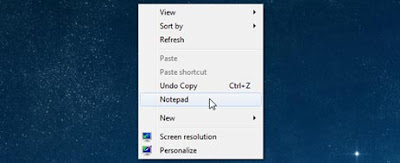
Every computer user has the most frequent application is opened, how these applications can easily access us? One way is to create a short-cut.


But for those of you who do not like messy desktop screen, there is an alternative to access applications quickly without having to add by-pass on the desktop. That is by way of adding right-click menu on the desktop. Follow the step by step below.

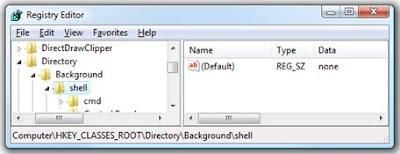
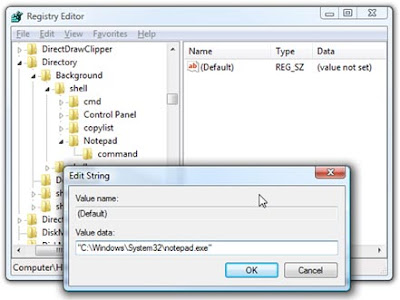
For example, we will add a notepad into the right click menu. Resgistry Open your editor and follow the trail the following:

HKEY_CLASSES_ROOTDirectoryBackgroundshell

Right click on the new Bombard pivotal and write the name of the application you want, this name will appear on the menu.


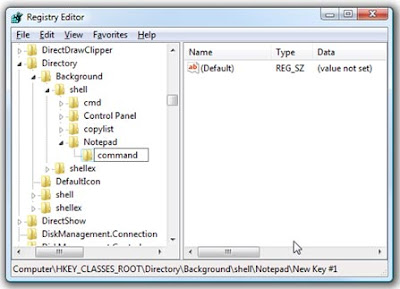
Right-click on Notepad and create a new pivotal pivotal new authority name (in lower case / lowercase).


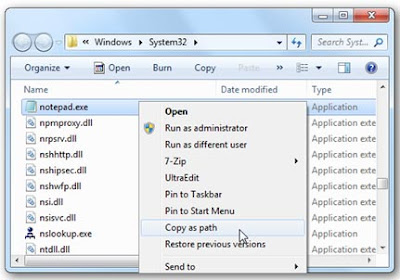
Next, you need a full trail of the application you want to connect and put it into the command value. for example notepad can be obtained as the following caption:


Click on the authority and double-click on the default input pivotal to the right then trail applications that have been copied.


Click ok and then retart the computer, right click on the desktop computer and you will see something new on the right click menu, good luck.

Read More..

Intranet and Extranet and Its Benefits!

0 comment
You must have heard, talk and discussion of what it's internet, intranet and extranet. But, do you ever know a specific understanding about the three things above?


If you know a more complete igin three things above, follow the explanations below.

INTERNET

Internet is derived from the word that has meaning Interconnection Networking computers with different types of relationships that form a network system that covers the whole world (the global computer network) by means of telecommunications such as telephone lines, radio links, satellite and others.

In regulating the integration of computer networks and communication protocols used are TCP / IP. TCP (Transmission Control Protocol) shall ensure that all links work properly, while the IP (Internet Protocol), which transmits information from one computer to another. TPC / IP in general serves to choose the best route of transmission of data, choose an alternate route if a route can not be in use, manage and transmit data packets delivery.

To be able to participate and use the facilities of the Internet, you usually have to subscribe to an ISP (Internet Service Provider) that exist in your city. ISPs are usually called Internet service providers or you can use the facilities of Telkom Instant Telkomnet.

By utilizing the Internet, the use of computers around the world it is possible to communicate with each other and sharing information with each other how to send e-mail, connect to another computer, send and receive files, discuss certain topics in the newsgroup and others.

INTRANET

Intranet is a computer network based TCP / IP protocol such as the internet it's just used in the inner company, office, and even internet cafes (WARNET) joke can be categorized Intranet. Inter-Intranet can communicate with each other through the Internet connection that provides the backbone of long distance communication. However, actually an Intranet does not need external connection to the Internet to function properly.


Intranet use all the custom TCP / IP, IP address, and other protocols), the client and server. HTTP protocol and several other Internet protocols (FTP, POP3, or SMTP) protocol is generally a component that is often used. an intranet can be understood as a "personal version of the Internet", or as a version of the Internet that are owned by an organization.

If a corporation / business / institution to expose a portion of the inner network to the outside community, this is called extranets. It usually does not remove all the content on the intranet to the public to make the intranet to extranet. For example we're buying software, books, etc. from an e-store, then usually we can access the Intranet portion of the store. Business entity / company can block access to their intranet via a router and put a firewall.

A firewall is a software / hardware that regulates a person's access into the intranet. Protection is done through a variety of network parameters if it's IP address, the number of piers, etc.. If the firewall is enabled then the access can be controlled so that we can only access a part of the company's Intranet which became known as an extranet.

EXTRANET

Extranet or Extranet is a private network that uses Internet protocols and public telecommunication system to share some information or business operation safely to the dealer (supplier), the seller (vendor), partner (partner), customers and others.


Extranet can also be interpreted as a corporate intranet that widened to users outside the company. Companies that build the extranet can exchange information with a large volume of EDI (Electronic Data Interchange), collaborate with other companies in a network of cooperation and others.

Conclusion

Internet, Intranet and Extranet, the trio is of o can be left in the current epoch complicated. All of which has its own function which is useful for the survival of the company, access to information and the development of the technology world.
Read More..

What Will Happen If Notebook submerged in water?

0 comment


If the notebook in a state of wet and dirty atmosphere flood affected, do not ever turn on (Power-on) let alone using electrical plugs. This situation will actually worsen Notebook. because it causes short-circuit on its
electronic components. Should immediately remove the cover to the place dry, discard all remaining atmosphere and the dirt path that linger with a clean cloth.

Next is to remove battere, then clean and mengeringkanya. If it looks dirty, clean with a soft cloth with a bit of atmosphere and rub gently. Beware of pole-pole plus-minus battere (usually of shiny yellow metal at the bottom / side of the body battere). Clean this section until dry. If it is dry you should not be installed battere back first to the Notebook.

Notebook basking under the sun, and put in a position to move inside the atmosphere could be right out. After dried in the sun until dry, can be sprayed with a hair dryer (hair dryer) to the inside of the cover can be reached. Spray dilubang others, such as speakers, port-connector, powe, keyboards and so on. Be careful not to position Hair-dryer too close so as not to damage the components.

Battere can also dijemu in the sun, but should be wrapped in a cloth first. Battere type of lithium (Li-Ion) are very sensitive to the thermal environment which can make its chemical structure is damaged and at risk of exploding. Should be dried to 1-3 hours. After itudapat inserted into the refrigerator (still wrapped in cloth), and do not memaskan into frezeer. Cold temperatures for several hours can restore the ability battere.


If you are familiar with the technical stuff, we can open cassis (body) cover to remove the main device (such as Processor, Hard Disk, Motherboard, RAM, etc.) to ensure everything is not damaged. Aritektur cover has a fairly simple system, composed of various modules are connected using labeling and cable connectors. To remember, because the components are usually small and delicate cover, an extra treatment needed careful.

Prepare toolset such as plus-minus screwdriver small and medium-sized, better if it has Ampere Meter. Turn the notebook, and all the nuts off the bottom so that the framework can be open (usually HDD, RAM Optical Drive located at the bottom). Memorize the location of the nut so that at the time of re-Symbian installation is not misplaced. Search carefully all the bolts are not yet open, and separate all the components that have been opened.


Notice all the existing cables and connectors. Do not get lost or damaged. Inijuga including existing circuit contained in the motherboard that should not be scratched or scuffed.

Components that pale susceptible to damage is a mechanical device such as Hard Disk and Optical Disc (CD / DVD), If you are able to open a second device, directly separate and dry the same as the above step.

Go all out off the cover and the maximum component that can be done. Separate all the equipment, then dry in the sun again until dry and occasionally sprayed with a hair-dryer. Once everything is dry measuring all components with Ampere Meter by connecting the connector to the device. If the number is still good is indicated, it means that components can be reused. Do not forget to do a contrast against battere well.

Replace all components carefully to positions semuladibagian on the notebook. Tighten all bautlalu spray after returning with a hair-dryer to make sure everything has dried, attach the original place battere.

We recommend using electricity to make the first contrast
, assuming battere have experienced the power vacuum. Do not immediately turned on, let battere absorb electrical energy for about an hour.


After that dislodged the power cord, then turn on as usual. If the cover display as usual, go into the BIOS menu by pressing the DEL or F12 (depending on the type of notebook). Check all information is correct BIOS tools, and do the necessary environment such as date, boot priority, and so on. If you do not understand, can do strange environment like its original condition when purchased. This option is certainly available dimenu BIOS.

If the cover does not turn on properly, it means that there are components that suffered severe damage. None other than pailihan replace them with new ones. We can call the businessman / play a lot of cover available. We can only hope that the damage is not too much and on key components such as processors and motherboards are worth quite expensive.

To avoid damaging the notebook, pale good attitude is to take some remedial action, namely menyelamatkanya before it flooded. But tragedy sometimes just happen and we need to take certain steps so that losses are not too large. It required extra activity as described above. Good luck, Good Luck
Read More..

Saturday, September 10, 2011

EPROM Reset Canon MP145, Cartridge not detected

0 comment

Okay, this is just fellow users sharing knowledge about the Canon MP145 multifunction printer, my older cousin has the same printer as me, and he has a problem concerning the printer, yes, the cartridge is not detected when refilling ink (with the injection method), after the check here and there and the help of the internet, finally found a solution, this printer is reset EPROM, the stages through which is not too complicated, here are caraReset EPROM for the Canon MP145:

• Plug the power cord into an electric socket, but do not turn on the printer first.

• Press and hold the Stop / Reset (with inverted red triangle aikon).

• Press and hold the Power button without removing the Stop / Reset (so now two buttons are held).

• Release the button Stop / Reset without removing the Power button.

• Double Click the Stop / Reset printer here will enter service mode, where the printer will not work before we exit the service mode.

• Wait for a moment when the printer is done warming up, and when the printer is loaded, press tombolStop / reset four times quickly.

• After that, exit service mode by turning off the printer and unplug the printer power cord from the power socket.

• The printer can be used again after re-plugged the power cord. And EPROM Reset process is completed.

After I try, there are some features missing after EPROM Reset this process, namely Ink that turned chaotic, and certainly not be accurate ink counter, but the important thing is still able to do printing, and it seems this way to be able to solve problems of the Waste Ink Tank on Canon MP145 Printer. But remember, this is only a software reset process, to dispose of waste ink tanks still have to unpack the printer, and it should be performed by experienced technicians

Read More..

 
Copyright 2011 @ MORE ADVANCED!